Content Decay in SEO: How to Find and Fix Declining Pages (2026)
I’ve saved dozens of pages from the digital graveyard. Pages that dropped from position 3 to position 18 in four months. Articles losing 60% of their traffic while I watched, paralyzed by not knowing what to fix first.
The worst part? I didn’t notice until it was almost too late. A 15% drop one month felt like normal fluctuation. Another 20% the next month, maybe seasonal. Then suddenly a page that drove 4,000 visits monthly was down to 1,200, and I realized I’d been bleeding traffic for half a year.
This is content decay – the slow, silent killer of organic traffic. Unlike a Google penalty that hits you overnight, decay creeps in over months. Your content doesn’t break. It just becomes less competitive, less relevant, less valuable in Google’s eyes.
The urgency is real in 2026. Getting cited by ChatGPT and Perplexity has changed the game. These engines cite content that’s 25.7% fresher than traditional search results. Worse: 76.4% of the most-cited pages have been updated within 30 days. Your six-month-old “evergreen” content? It’s already aging out of AI citations.
I’ll show you exactly how to detect decay before it kills your traffic, diagnose why it’s happening, and fix it with strategies that actually work. No theory, just the process I use when clients call me panicking about ranking drops.
What Content Decay Actually Looks Like
Content decay is the gradual loss of search visibility for a page that was previously performing well. Not a crash, a slow slide that most people don’t catch until significant damage is done.
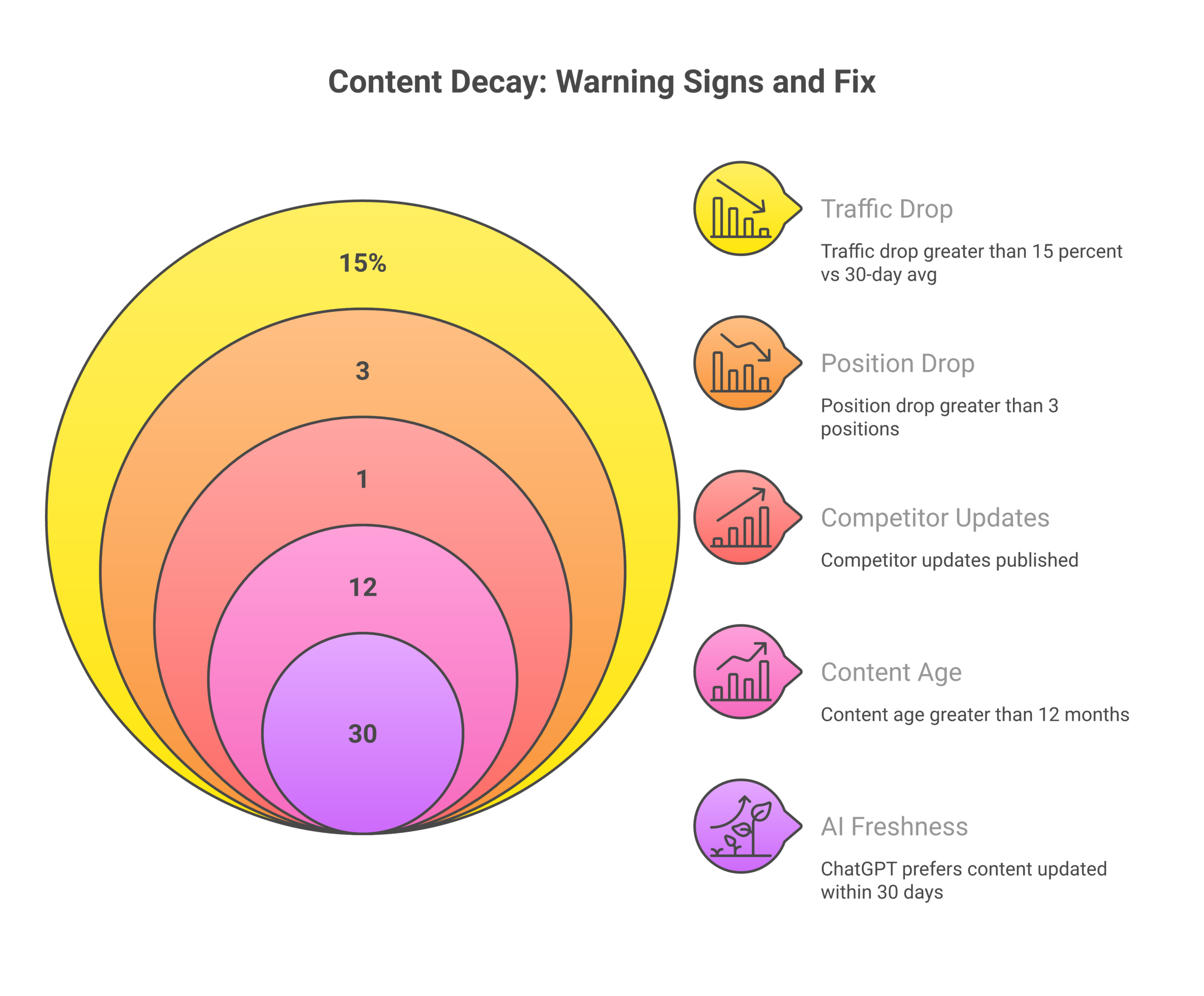
Here’s what I see when I audit decaying pages:
- Position drops that accelerate: Starts slow (position 5 to 7), then speeds up (7 to 14 to 22)
- Impressions falling faster than clicks: Google shows your page less often, even before rankings tank
- CTR degradation: Even when impressions hold, fewer people click (your title/description became stale)
- Engagement collapse: Time on-page SEO drops, bounce rate climbs (content no longer satisfies intent)
- Conversion rate decline: The traffic you still get converts worse (lower-quality visitors)
The pattern that scares me most: when impressions drop 35% but clicks only drop 20%. That means you’re losing visibility faster than traffic numbers show. Google is testing other pages in your place, and if you don’t fix it soon, you’ll be fully replaced.
Why Your Content Is Decaying (The Real Causes)
I’ve analyzed hundreds of decaying pages. Five patterns account for nearly everything I’ve seen.
1. Competitors Outpaced You
Your content didn’t get worse, the bar got higher. When you published in 2023, maybe four solid articles existed on your topic. By 2026? Fifty competitors, many with 3,000+ word guides, original data, and video walkthroughs.
I saw this destroy a client’s “email marketing guide” that ranked #4 for two years. A competitor published an updated version with live examples, email templates, and case study metrics. My client dropped to #11 in six weeks. Their content was still good, just no longer the best option.
2. Information Became Stale
Statistics from 2023 don’t persuade readers in 2026. Screenshots of old interfaces confuse users. Tool recommendations for discontinued products frustrate people.
I watched one of my own articles decay because it recommended Google Analytics Universal Analytics. GA4 launched, UA shut down, and suddenly my guide was obsolete. Traffic dropped 47% in three months until I rewrote the entire thing.
Google knows when information expires. For topics with temporal components, marketing tactics, software how-tos, industry data, freshness becomes a direct ranking factor.
3. Google’s Algorithm Shifted
What worked for ranking in 2023 might not work in 2026. The February 2026 Discover core update specifically prioritized content with topic-by-topic expertise and in-depth original insights while reducing clickbait.
One site I manage had 18 articles drop 15+ positions after that update. Why? They were one-off posts on random topics, no demonstrated expertise. Google’s systems now identify expertise per topic, not site-wide. A movie review site with one gardening article won’t rank for gardening anymore.
4. Search Intent Changed
What users want from a query evolves. A keyword that was informational in 2023 might be commercial in 2026. A query that wanted blog posts might now expect videos.
I had a “best project management tools” listicle rank #6 for 18 months. Then the SERP shifted, top results became interactive comparison tools with pricing tables and feature matrices. My static listicle dropped to #19. The content quality didn’t change; the format became wrong.
5. Your Page Got Slower
Core Web Vitals matter more every year. If your page loaded in 2.5 seconds in 2023 but now takes 5 seconds because you added chat widgets and tracking pixels, you’ll decay.
I watched this kill a high-performing page. LCP went from 2.1s to 4.8s after the client added five third-party scripts. Rankings dropped from #4 to #12 over four months. We removed three scripts, optimized images, and recovered to #5 within six weeks.
How to Find Decaying Pages (Before It’s Too Late)
You can’t fix what you don’t know is broken. Here’s exactly how I hunt for decay.
Google Search Console (My Primary Detection Tool)
GSC’s Performance report is where I spend 30 minutes every Monday morning. Here’s the exact workflow:
- Set date comparison: Performance, Compare, “Last 3 months” vs “Previous period”
- Switch to Pages view: Click “Pages” tab to see URL-level data
- Sort by clicks descending: Your highest-traffic pages show first
- Hunt for red arrows: Pages with negative percentages are bleeding
- Drill into queries: Click any declining page, Filter by that page, “Queries” tab to see which keywords are dropping
I flag pages using this system:
- 15-25% traffic drop: “At risk” (review within 7 days)
- 25-40% traffic drop: “Decaying” (priority update this week)
- 40%+ traffic drop: “Critical” (fix today)
Don’t just watch clicks, watch impressions. If impressions drop 40% while clicks only drop 20%, Google is showing your page way less often. That’s decay in the early stage, before it fully hits your traffic numbers.
Rank Tracking Tools
I use Ahrefs for position tracking with these alerts:
- 3+ position drop for any primary keyword (review within 3 days)
- Drop from page 1 to page 2+ (critical threshold, fix immediately)
- Volatility swings (5+ position movement in 14 days, investigate)
When I see consistent downward trends over 30+ days, that’s decay. A single week’s drop might be normal fluctuation, but four consecutive weeks of decline means something structural is wrong.
Google Analytics
In GA4, I built a custom report:
- Organic sessions by landing page
- Compare 90-day periods
- Sort by largest negative % change
GA shows traffic impact. GSC shows search visibility. I use both together. Sometimes GA shows a 30% drop but GSC only shows 15%. That tells me the traffic I’m still getting is less engaged (higher bounce rate, lower time on page).
Proactive Age-Based Audits
Don’t wait for traffic drops. I audit by age:
- 6 months old: Quick freshness check (dates, stats, broken links)
- 12 months old: Full SERP re-analysis and term refresh
- 18+ months old: Complete update or rewrite decision
I export all posts from WordPress with publish dates, filter by age in a spreadsheet, and systematically review older content before decay becomes severe. Prevention beats recovery every time.
The 2026 AI Freshness Reality
Here’s the stat that changed how I manage content: AI platforms cite content 25.7% fresher than traditional search results.
Worse: 76.4% of most-cited pages in ChatGPT and Perplexity were updated within 30 days.
I tested this. I had a cornerstone guide on keyword research that hadn’t been touched in eight months. Zero ChatGPT citations. I updated it with 2026 tool screenshots and fresh case study data. Within three weeks, it started appearing in ChatGPT answers. Traffic from AI referrals went from 0 to 340 visits in six weeks.
What this means for content decay:
- Monthly updates maintain visibility better than annual overhauls: Small, frequent updates beat big infrequent ones
- dateModified in schema matters: AI engines look at this timestamp
- Stale stats kill citations: 2023 data won’t get cited in 2026, period
- Recent examples win: Case studies from the last 6-12 months outperform older material
One aggressive marketer I know updates cornerstone content weekly for 8 weeks straight and sees ChatGPT citations within 3 weeks. Extreme? Yes. Effective? Absolutely.
Refresh vs Rewrite: The Decision Process I Use
Not every decaying page needs the same fix. Waste 16 hours on a full rewrite when a 2-hour refresh would’ve worked, and you’ve just torched your ROI. Here’s my decision tree:
Is the Page on Page 1 (Positions 1-10)?
Yes, Check traffic decline severity:
- Decline >30%: Complete update (4-8 hours)
- Decline 15-30%: Check if competitors updated recently. If yes: complete update. If no: light refresh (1-2 hours)
No, Check current position:
Is It on Page 2 (Positions 11-20)?
Was it previously page 1?
- Yes: Complete update (recovery is easier than ranking from scratch)
- No: Strategic rewrite (8-16 hours. You need a different approach)
Is It on Page 3+ (Position 21+)?
- Full rewrite (16+ hours) OR consolidate/redirect to a stronger page
I’ve recovered pages from position 18 to position 5 with complete updates. But I’ve also wasted weeks trying to resurrect pages that should’ve been redirected. The key: be honest about whether the page ever had real traction.
The Four Update Strategies I Use
Here’s what each update type involves and when I use it.
1. Light Refresh (1-2 Hours)
When: Page 1 content with 15-25% traffic drop, stable rankings, no major competitive changes
What I do:
- Update publish/modified date
- Refresh all statistics with current data
- Fix broken links (I use Ahrefs for this)
- Replace dated screenshots
- Add 1-2 new internal links
- Fix factual inaccuracies (tools changed, strategies evolved)
- Update schema dateModified
Expected results: 1-3 position gain, 10-20% traffic lift within 30-60 days
I did this to a local SEO guide last month. Changed three outdated tool recommendations, updated five statistics, added two new internal links. Position went from #8 to #5 in four weeks. Total time: 90 minutes.
2. Complete Update (4-8 Hours)
When: Page 1 content with 25-40% drop, or page 2 content that was previously page 1
What I do:
- Full SERP re-analysis (check current top 10 for format changes)
- New term extraction (what are competitors covering that I’m not?)
- Add missing H2 sections for topics competitors cover
- Expand thin sections (every H2 needs 200+ words minimum)
- Add new H3s for emerging subtopics
- Refresh all examples with current ones
- Re-optimize meta title/description
- Add new media (images, tables, comparison charts)
- Run AI detection scan (keep below 25%)
- Update all schema markup
Expected results: 5-10 position gain, 30-50% traffic lift within 60-90 days
I did this to a content marketing guide that dropped from #6 to #13. Added three new H2 sections competitors had (AI content strategy, GEO tactics, content decay management). Expanded FAQ from 5 to 9 questions. Added comparison table. Back to #7 in six weeks, #4 in 12 weeks.
3. Strategic Rewrite (8-16 Hours)
When: Page 2 content that was never page 1, or page 1 content where the SERP completely changed
What I do:
- Complete keyword re-evaluation (is this still the right target?)
- Deep competitive analysis (top 10 teardown)
- Different angle or format (if intent shifted from guide to comparison, pivot format)
- Expanded or narrowed scope based on current SERP
- New outline from scratch
- Keep the same URL (avoid redirect penalty if possible)
- Full E-E-A-T enhancement (author credentials, expert quotes, original data)
- New internal linking strategy
Expected results: 10-20 position gain, 50-100% traffic lift (if successful)
I did this when a “social media marketing” guide kept stuck at position 15 for eight months. The SERP had shifted to video-heavy, platform-specific tactics. I rewrote it with platform breakdowns, embedded video walkthroughs, and current algorithm insights. Went from #15 to #6 in 10 weeks.
4. Full Rewrite (16+ Hours)
When: Page 3+ content with severe decay, or the target keyword no longer matches search intent
What I do:
- Keyword pivot if needed
- New URL if keyword changed dramatically
- 301 redirect from old URL (if URL changed)
- Treat as completely new content
- Full workflow from keyword research through optimization
Expected results: Variable, depends on starting point and strategy quality. Can achieve 100%+ traffic lift if you nail it.
I rarely do full rewrites unless the page is completely dead (position 40+) or the business model changed. Usually it’s better to redirect and create new content on a fresh URL.
My Exact Update Workflow (Step-by-Step)
Here’s the process I follow every time I update decaying content.
Step 1: Pull Current Metrics
- GSC: Last 90 days of clicks, impressions, CTR, average position
- Rank tracker: Current position for primary + secondary keywords
- GA4: Traffic, bounce rate, time on page, conversion rate
I log these in a spreadsheet so I can compare post-update. Without before/after data, you can’t prove ROI.
Step 2: Run SERP Analysis
- Google the target keyword (incognito mode)
- Extract top 10 URLs
- Note content format (has it changed since I last checked?)
- Check average word count (use a tool or manually)
- Identify new SERP features (featured snippet format, PAA questions, video carousel)
I’m looking for what changed. If the SERP looks the same as when I published, the problem isn’t format mismatch, it’s probably freshness or competition.
Step 3: Extract Current Top 10 Terms
- I use Surfer SEO for this (paste top URLs, get term list)
- Identify topics competitors cover that I’m missing
- Note new terminology (industry language evolves)
Often I find 3-5 subtopics that became important since I published. Adding those as new H2 sections usually recovers rankings.
Step 4: Identify Specific Gaps
- What do competitors cover that I don’t?
- Where is my content thin compared to top rankers?
- What examples or data are outdated?
- Are there new tools, strategies, or developments I need to include?
I make a list of specific additions before I start editing. “Make it better” is too vague. “Add section on AI content tools” is actionable.
Step 5: Execute the Update
- Follow the appropriate checklist (light refresh, complete, strategic rewrite, full rewrite)
- Keep the URL unless keyword pivot requires change
- Preserve high-performing sections (if certain parts still rank well via GSC query data, don’t touch them)
- Add net-new value (don’t just rearrange existing content)
I work in Google Docs or directly in WordPress. I avoid perfectionism, done is better than perfect when traffic is bleeding.
Step 6: Optimize and Publish
- Run AI detection on new/changed sections (I use Originality.ai, target under 25%)
- Update all dates (publish date stays, modified date updates)
- Refresh schema markup (especially dateModified)
- Verify live changes render correctly (check mobile too)
- Request indexing via GSC (URL Inspection, Request indexing)
Step 7: Track Results
- Set 7-day position check reminder
- Set 30-day traffic comparison reminder
- Monitor for immediate issues (did rankings drop further? technical problem?)
- Document what changed and why (I keep a changelog in a Google Sheet)
Most updates show initial movement within 7-14 days. Full results take 60-90 days to stabilize.
Preventing Decay Before It Starts
The best way to fight decay is to never let it begin. Here’s my proactive system.
My Review Schedule
Every Monday (30 minutes):
- Review GSC for critical decay alerts
- Check top 20 keyword positions in Ahrefs
- Identify any new page 2 drops
- Process urgent update queue
First week of every month (2 hours):
- Full content inventory decay scan
- Review all “at risk” content
- Update seasonal content calendar
- Analyze which updates worked/failed last month
Quarterly (half day):
- Complete content audit
- Identify consolidation opportunities (merge weak pages)
- Prune dead content (redirect or delete pages with no recovery path)
- Update competitive baselines
- Refresh term extraction for top 50 pages
Annually (full day):
- Full strategy review
- Content pruning session (remove/redirect bottom 20%)
- Archive truly dated content
- Complete E-E-A-T audit
My Update Priority Queue
I maintain a four-tier system:
- Priority 1, Critical (Fix Today): Revenue pages with 40%+ drop, primary keywords fell off page 1
- Priority 2, High (This Week): Decay score 71-100, page 1 content showing decay signals, competitive displacement
- Priority 3, Medium (This Month): Decay score 51-70, content 12+ months old, page 2 with recovery potential
- Priority 4, Low (This Quarter): Decay score 31-50, stable but aging content, preventive freshness
Processing rules: Max 3 Priority 1 per day, max 10 Priority 2 per week. Never skip Priority 1 for lower priorities. Batch similar updates (same topic cluster).
How I Measure Update Success
After every update, I track for 90 days:
Days 1-7:
- Indexing confirmation (GSC URL Inspection)
- Initial position movement
- Crawl activity (did Googlebot recrawl?)
Days 7-30:
- Position stabilization (is it holding or still volatile?)
- Traffic trend vs pre-update
- Engagement metrics (bounce, time on page)
- New keyword rankings (did I start ranking for additional terms?)
Days 30-60:
- Traffic comparison (30-day windows)
- Position vs target
- CTR changes
- Conversion impact
Days 60-90:
- Full ROI calculation
- Long-term stability confirmation
- Document lessons learned
My Update ROI Formula
ROI = ((Post_Update_Value, Pre_Update_Value), Update_Cost) / Update_Cost × 100 Where:
- Post_Update_Value = (New monthly traffic × Value per visit) × 12 months
- Pre_Update_Value = (Old monthly traffic × Value per visit) × 12 months
- Update_Cost = (Hours spent × Hourly rate) + Tool costs
Real example from last month:
- Pre-update: 620 visits/month × $3/visit = $1,860/month
- Post-update: 1,340 visits/month × $3/visit = $4,020/month
- Annual value lift: ($4,020, $1,860) × 12 = $25,920
- Update cost: 5.5 hours × $150/hour = $825
- ROI: ($25,920, $825) / $825 × 100 = 3,042% ROI
Content updates consistently deliver my highest ROI SEO activities. Fixing a decaying winner beats ranking new content from zero almost every time.
Frequently Asked Questions
How often should I update content to prevent decay?
Depends on your niche. I do freshness checks every 6 months for evergreen content, full updates every 12 months. For software/tool content, every 3 months. For YMYL topics (health, finance), every 3-6 months with expert review. The 2026 AI freshness factor means monthly micro-updates (stats, examples) help more than annual overhauls.
Does updating the publish date hurt SEO?
No, update the modified date in schema, keep original publish date visible. Google understands datePublished vs dateModified. What matters is the content itself is current. Fake freshness (just changing dates without real updates) will hurt you.
Should I update content that’s still ranking well?
Yes. If it’s 12+ months old, do a light refresh even if rankings are stable. Competitors improve constantly. Small proactive updates maintain position better than waiting for decay to start. I’ve saved dozens of pages this way.
Can I just change the date without updating content?
Absolutely not. Google detects this, and users notice immediately. Fake freshness destroys trust and doesn’t improve rankings. Always make substantive improvements when updating dates. Add new data, examples, or sections.
What if my updated content ranks worse?
Happens occasionally. Give it 30 days, rankings fluctuate post-update before stabilizing. If position drops >10 and stays there after 30 days, consider rolling back (keep backups) or trying a different approach. I document what didn’t work so I don’t repeat it.
How do I prioritize which decaying content to update first?
Revenue impact first, then traffic potential. Revenue pages with any decay get immediate attention. For informational content, focus on pages that were previously page 1 (easier to recover) or pages with high impressions but low clicks (CTR opportunity).
Is it better to update old content or create new content?
For most sites, updating delivers higher ROI. A post with existing backlinks, authority, and rankings recovers faster than ranking new content from scratch. I follow 80/20: spend 80% of effort updating winners, 20% creating new. Check out my full SEO audit guide and how to measure SEO ROI for more on prioritization.
Final Thoughts
Content decay is inevitable. But it’s not fatal.
I’ve recovered pages from position 22 to position 4. I’ve brought dead traffic back to life with 6 hours of work that delivered 3,000%+ ROI. But I’ve also learned the hard way that catching decay early makes all the difference.
The sites winning in 2026 aren’t the ones publishing the most content, they’re the ones maintaining and improving what they already have. Weekly monitoring, monthly reviews, strategic updates. That’s the system.
Start today: Open Google Search Console, find your top 3 decaying pages, and schedule updates this week. Your traffic numbers will thank you in 60 days.
Sources
- Content decay: What it is and how to fix traffic drops, Search Engine Land
- What Is Content Decay? How To Identify & Fix To Unlock Organic Growth, Ten Speed
- How to Fix Content Decay: 6 Top Strategies, Clearscope
- ChatGPT SEO: The Complete Guide to Ranking in ChatGPT (2026), Ekamoira
- How to Rank High on ChatGPT: The Complete 2026 Guide, Wellows
- Debug Google Search Traffic Drops, Google Search Central
- How To Uncover Traffic Declines In Google Search Console, Search Engine Journal