

I’ve watched plenty of my own content slowly lose rankings over the years. A post that was crushing it at position 3 gradually slips to position 8, then 15, then disappears from page one entirely. Traffic that was steady starts dropping month after month. This isn’t a sudden penalty or technical disaster—it’s content decay, and it’s one of the most insidious problems in SEO.
Content decay is the gradual decline in organic traffic, rankings, and relevance for a specific page. Unlike a sudden drop from a Google penalty or technical error, decay happens slowly over months or even years. Your content doesn’t break—it just becomes less competitive, less relevant, or less valuable in Google’s eyes.
The problem is real and accelerating in 2026. With getting cited by ChatGPT and Perplexity engines like ChatGPT actively prioritizing fresh content (citing pages that are 25.7% fresher than traditional search results), and with 76.4% of the most-cited pages having been updated within the past 30 days, the shelf life of content is shorter than ever.
In this guide, I’ll show you exactly how to detect content decay, understand why it happens, decide whether to refresh or rewrite, and implement update strategies that actually work.
What Is Content Decay?
Content decay is the slow, progressive loss of organic search visibility for a page that was previously performing well. It’s not a sudden crash—it’s a gradual slide down the rankings that many site owners don’t notice until significant traffic has been lost.
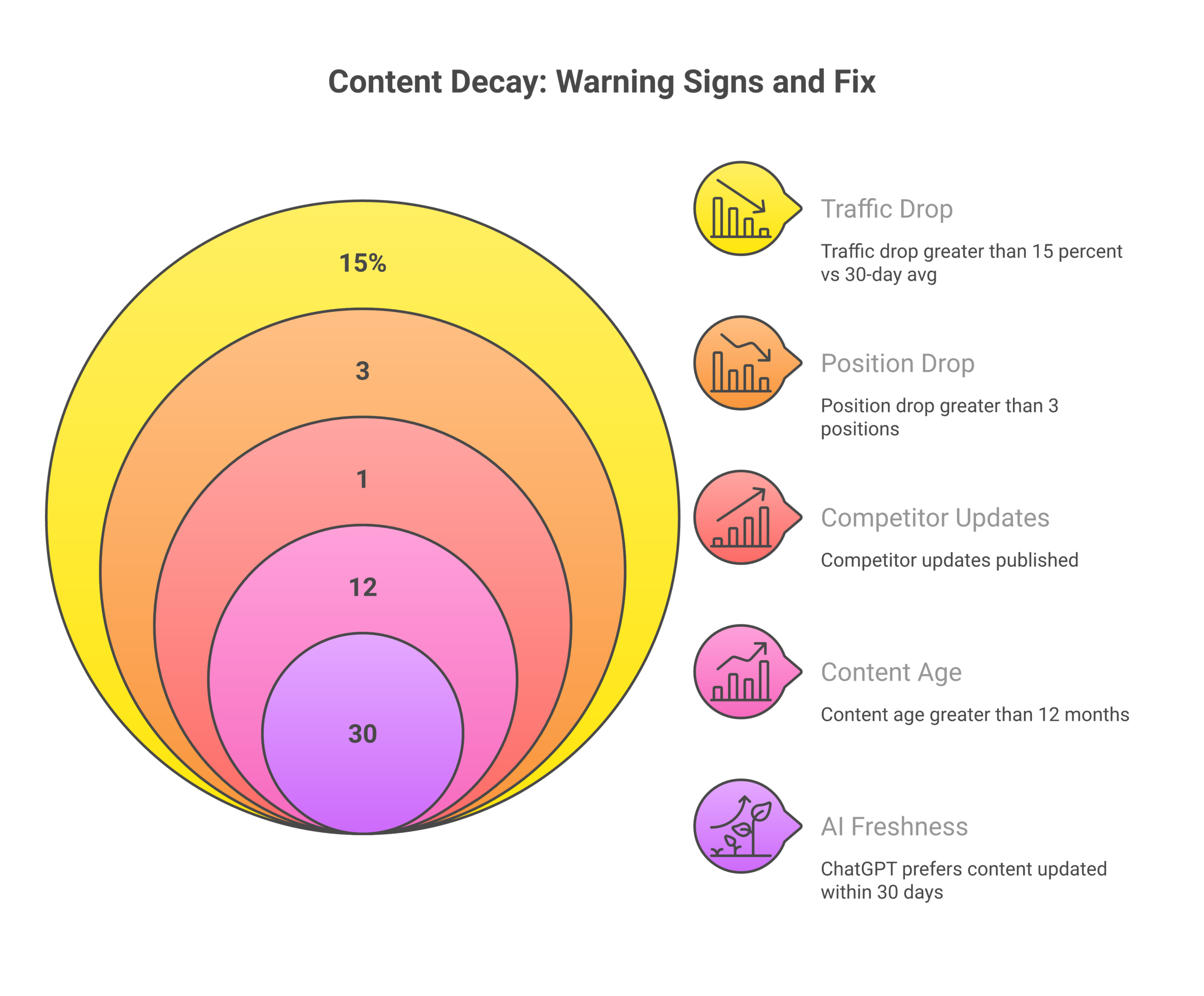
Here’s what decay typically looks like:
- Declining rankings: A page that ranked in positions 3-7 slowly drops to 10-15, then 20+
- Falling impressions: Fewer people see your page in search results
- Decreasing clicks: Even if impressions hold, click-through rates drop
- Reduced time on-page SEO: Visitors spend less time engaging with the content
- Lower conversion rates: Even the traffic you get converts less effectively
The tricky part? Content decay often goes unnoticed because it happens gradually. You might attribute a 10% traffic drop to normal fluctuations, then another 15% to seasonality, and before you know it, a page that was driving 5,000 visits per month is down to 1,500.
Why Content Decays: The 5 Primary Causes
After analyzing hundreds of decaying pages across my own sites and client properties, I’ve identified five root causes that account for nearly all content decay:
1. Increased Competition
Your content didn’t get worse—the competition got better. When you published your article in 2023, maybe only 3-4 comprehensive pieces existed on the topic. By 2026, there are 50+ competing articles, many longer, more detailed, and more recent than yours.
Competitors see what’s ranking and create something better. They add more examples, better visuals, updated statistics, and fresher insights. Your once-dominant content becomes just another option in a crowded field.
2. Outdated Information
Information becomes stale. Statistics from 2023 aren’t compelling in 2026. Screenshots of old interfaces confuse users. Tool recommendations for discontinued products frustrate readers. Examples referencing outdated trends make your content feel irrelevant.
Google understands when information has expiration dates. For topics with temporal components—marketing strategies, tool reviews, “how to” guides for software, industry statistics—freshness becomes a ranking factor.
3. Algorithm Changes
Google’s algorithm evolves constantly. What worked for ranking in 2023 might not work in 2026. Google’s core updates can shift what the algorithm values—from exact keyword matches to semantic relevance, from word count to user engagement, from backlink quantity to backlink quality.
The February 2026 Discover core update specifically prioritized content with topic-by-topic expertise, in-depth original insights, and timely information while reducing sensational clickbait. If your content doesn’t align with current algorithm priorities, it decays regardless of quality.
4. Search Intent Shifts
What users want from a query changes over time. A keyword that was informational in 2023 might be transactional in 2026. A query that used to want blog posts might now expect video content. A search that wanted beginner guides might now demand advanced tactics.
When you check the current SERP for your target keyword and see that your content type no longer matches what’s ranking (you have a 1,500-word article but the top 10 are all 3,000+ word guides with videos), that’s intent shift causing decay.
5. Technical and User Experience Issues
Page speed matters more in 2026 than ever. Core Web Vitals—Largest Contentful Paint (LCP), Interaction to Next Paint (INP), and Cumulative Layout Shift (CLS)—directly impact rankings. If your page loaded in 2.5 seconds in 2023 but now takes 5 seconds because you’ve added tracking scripts and widgets, decay follows.
Mobile usability issues, intrusive interstitials, and poor navigation structure also contribute to gradual ranking losses.
How to Detect Content Decay: Finding Declining Pages
You can’t fix what you don’t know is broken. Here’s how I systematically identify decaying content:
Method 1: Google Search Console (Primary Tool)
best SEO tools for business owners‘s Performance report is your best friend for detecting decay. Here’s my process:
- Set a comparison date range: Go to Performance → Select “Compare” → Choose “Compare last 3 months” to “Previous period”
- Switch to Pages view: Click the “Pages” tab to see URL-level data
- Sort by clicks (descending): This shows your highest-traffic pages first
- Look for red arrows: Pages showing red negative percentages in the comparison are losing traffic
- Dig into queries: Click any declining page → Filter by that page → Check “Queries” tab to see which keywords are dropping
I flag any page with:
- 15-25% traffic drop: At risk (schedule review)
- 25-40% traffic drop: Decaying (priority update)
- 40%+ traffic drop: Critical (immediate action)
Also look at impressions. If impressions drop significantly, Google is showing your page less often—a clear decay signal even if clicks are stable.
Method 2: Rank Tracking Tools
Tools like Ahrefs, SEMrush, and SE Ranking show you position changes over time. Set up alerts for:
- Position drops of 3+ places for primary keywords
- Drops from page 1 to page 2+ (critical threshold)
- Volatile rankings (swinging 5+ positions in 14 days)
I track every page’s primary keyword and set weekly position checks. When I see consistent downward trends over 30+ days, that’s decay, not normal fluctuation.
Method 3: Google Analytics
In GA4, create a custom report showing:
- Organic sessions by landing page
- Compare 90-day periods
- Sort by largest negative percentage change
GA shows you the traffic impact, while GSC shows you the search visibility. Use both together for complete decay diagnosis.
Method 4: Content Age Audit
Don’t wait for traffic to drop. Proactively audit content by age:
- 6 months old: Freshness check (update dates, stats, links)
- 12 months old: Full SERP re-analysis and term refresh
- 18+ months old: Comprehensive update or rewrite decision
I export all my posts from WordPress with publish dates, then filter by age and systematically review older content before decay becomes severe.
The AI Freshness Factor: Why Updates Matter More in 2026
Here’s a data point that changed how I think about content decay: AI platforms cite content that is 25.7% fresher than traditional search results. ChatGPT, Perplexity, and Google’s AI Overviews actively prioritize recently updated content.
Even more striking: 76.4% of the most-cited pages in AI results have been updated within the past 30 days.
This means the content that worked a year ago may not get cited by AI systems today. With AI search growing rapidly (Gartner predicts keyword research guide drops of 25% by 2026 as users shift to AI), optimizing for AI citation is no longer optional.
What this means for content decay:
- Update frequency matters more: Monthly refreshes maintain visibility better than annual overhauls
- Publication dates are signals: Both datePublished and dateModified in schema markup influence AI citation
- Stale statistics kill citations: Data from 2023 won’t get cited in 2026—AI models prioritize current information
- Recent examples win: Case studies, examples, and references from the past 6-12 months outperform older material
One marketer I spoke with updated their cornerstone content weekly for 8 weeks and saw ChatGPT citations within 3 weeks. Aggressive? Yes. Effective? Absolutely.
Refresh vs Rewrite: The Decision Framework
Not all decaying content needs the same treatment. Here’s the decision tree I use to determine whether a page needs a light refresh, comprehensive update, strategic rewrite, or full rewrite:
Decision Tree (Text Format)
START: Content flagged for update

Question 1: Is current position Page 1 (1-10)?
├── YES → Go to Question 2
└── NO → Go to Question 4

Question 2: Is traffic decline >30%?
├── YES → COMPREHENSIVE UPDATE
└── NO → Go to Question 3

Question 3: Have competitors significantly updated?
├── YES → COMPREHENSIVE UPDATE
└── NO → LIGHT REFRESH

Question 4: Is current position Page 2 (11-20)?
├── YES → Go to Question 5
└── NO → Go to Question 6

Question 5: Was it previously Page 1?
├── YES → COMPREHENSIVE UPDATE (recovery priority)
└── NO → STRATEGIC REWRITE (new approach needed)

Question 6: Is position Page 3+ (21+)?
├── YES → FULL REWRITE or CONSOLIDATE/REDIRECT
└── NO → Evaluate consolidation with stronger content
Update Strategies: 4 Approaches for Different Decay Levels
Here’s what each update type involves and when to use it:
1. Light Refresh (1-2 hours)
When to use: Page 1 content with minor decay (15-25% traffic drop), stable rankings, no major competitive changes
Checklist:
- Update publication/modified date
- Refresh statistics with current data
- Fix broken links
- Update screenshots/images if dated
- Add 1-2 new internal links
- Check and fix any factual inaccuracies
- Update schema dateModified
Expected outcome: 1-3 position gain, 10-20% traffic lift
2. Comprehensive Update (4-8 hours)
When to use: Page 1 content with significant decay (25-40% drop), or Page 2 content that was previously Page 1
Checklist:
- Full SERP re-analysis (check current top 10)
- New term extraction (compare to original target keywords)
- Add missing topics from current top 10
- Expand thin sections (150-300 words per H2 minimum)
- Add new H2/H3 for emerging subtopics
- Refresh all examples and data
- Re-optimize meta title/description
- Add new media (images, tables, videos)
- Re-run AI detection scan (keep below 25%)
- Update all schema markup
Expected outcome: 5-10 position gain, 30-50% traffic lift
3. Strategic Rewrite (8-16 hours)
When to use: Page 2 content that was never Page 1, or Page 1 content where competitors have drastically changed the game
Checklist:
- Complete keyword re-evaluation
- New competitive analysis (top 10 deep dive)
- Different content angle/format (if SERP intent has shifted)
- Expanded or narrowed scope based on current intent
- New outline from scratch
- Preserve URL (avoid redirect if possible)
- Full E-E-A-T enhancement (author credentials, expert quotes, original data)
- New internal linking strategy
Expected outcome: 10-20 position gain, 50-100% traffic lift
4. Full Rewrite (16+ hours)
When to use: Page 3+ content with severe decay, or content where the target keyword no longer matches search intent
Checklist:
- Keyword pivot if needed
- New URL structure (if keyword changed)
- 301 redirect from old URL (if URL changed)
- Treat as new content creation
- Full content workflow from research to optimization
Expected outcome: Variable—depends on starting position and new strategy. Can achieve 100%+ traffic lift if successful.
My Content Update Workflow (Step-by-Step)
Here’s the exact process I follow when updating decaying content:
Step 1: Pull Current Metrics
- GSC: Last 90 days of clicks, impressions, CTR, average position
- Rank tracker: Current position for primary and secondary keywords
- GA4: Traffic, bounce rate, time on page, conversions
Step 2: Run Current SERP Analysis
- Google the target keyword
- Extract top 10 URLs
- Note content format (guide, listicle, comparison, video)
- Check average word count
- Identify SERP features (featured snippet, PAA, video carousel)
Step 3: Extract Current Top 10 Terms
- Use a tool like Surfer SEO or manually analyze headings
- Identify topics covered by competitors that you’re missing
- Note new terminology or industry shifts
Step 4: Identify Specific Gaps
- What do competitors cover that I don’t?
- Where is my content thin compared to top rankers?
- What examples or data are outdated?
- Are there new tools, strategies, or developments to include?
Step 5: Execute Update
- Follow the appropriate update type checklist (light refresh, comprehensive, strategic rewrite, or full rewrite)
- Maintain URL unless keyword pivot requires change
- Preserve high-performing elements (if certain sections still rank well, keep them)
- Add net-new value (don’t just rearrange existing content)
Step 6: Optimize and Publish
- Run AI detection on new/changed sections (keep below 25%)
- Update all dates and timestamps
- Refresh schema markup (especially dateModified)
- Verify live changes render correctly
- Request indexing via Google Search Console
Step 7: Track Results
- Set 7-day position check reminder
- Set 30-day traffic comparison reminder
- Monitor for immediate issues
- Document what was changed and why (for future reference)
Proactive Content Decay Prevention
The best way to fight content decay is to prevent it from happening in the first place. Here’s how I stay ahead:
Scheduled Review Cadence
Weekly (Every Monday):
- Review all critical decay alerts
- Check top 20 keyword positions
- Identify any new Page 2 drops
- Process urgent update queue
Monthly (First week):
- Full content inventory decay scan
- Review all at-risk content
- Update seasonal content calendar
- Analyze update success rates
Quarterly:
- Complete content audit
- Identify consolidation opportunities
- Review and prune dead content
- Update competitive baselines
- Refresh term extraction for top 50 pages
Annually:
- Full strategy review
- Content pruning (remove/redirect underperformers)
- Archive dated content
- Comprehensive E-E-A-T audit
Priority Queue Management
I maintain a four-tier update queue:
- Priority 1 – Critical (Today): Revenue pages with 40%+ traffic drop, primary keywords dropped from Page 1
- Priority 2 – High (This Week): Severe decay signals, Page 1 content with decay, competitive displacement
- Priority 3 – Medium (This Month): Content 12+ months without update, Page 2 content with recovery potential
- Priority 4 – Low (This Quarter): Stable but aging content, preventive freshness updates
Processing rules: Maximum 3 Priority 1 updates per day, maximum 10 Priority 2 per week. Never skip Priority 1 for lower priorities.
Measuring Update Success: What to Track
After updating decaying content, track results for 90 days:
Day 1-7:
- Indexing confirmation (GSC)
- Initial position movement
- Crawl activity
Day 7-30:
- Position stabilization
- Traffic trend vs pre-update
- Engagement metrics (bounce, time on page)
- New keyword rankings
Day 30-60:
- Traffic comparison (30-day windows)
- Position compared to target
- CTR changes
- Conversion impact
Day 60-90:
- Full ROI calculation
- Long-term stability confirmation
- Lessons learned documentation
Update ROI Formula
I calculate ROI for every significant update to understand what’s working:
ROI = ((Post_Update_Value - Pre_Update_Value) - Update_Cost) / Update_Cost × 100

Where:
- Post_Update_Value = (New monthly traffic × Value per visit) × 12 months
- Pre_Update_Value = (Old monthly traffic × Value per visit) × 12 months
- Update_Cost = (Hours spent × Hourly rate) + Tool costs
Example:
- Pre-update: 500 visits/month × $2/visit = $1,000/month
- Post-update: 1,200 visits/month × $2/visit = $2,400/month
- Annual value lift: ($2,400 – $1,000) × 12 = $16,800
- Update cost: 6 hours × $100/hour = $600
- ROI: ($16,800 – $600) / $600 × 100 = 2,700% ROI
In my experience, content updates consistently deliver some of the highest ROI activities in SEO. It’s far easier to fix a decaying winner than to rank a new post from scratch.
Frequently Asked Questions
How often should I update my content to prevent decay?
It depends on your niche and content type. For evergreen content, I recommend a freshness check every 6 months and a full update every 12 months. For news, trending, or software-related content, update every 3 months. For YMYL (Your Money Your Life) topics like health or finance, update every 3-6 months with mandatory expert review.
Does updating the publish date hurt SEO?
No. Update the modified date in your schema markup, but keep the original publish date visible. Google understands the difference between datePublished and dateModified. What matters is that the content itself is current and valuable.
Should I update content that’s still ranking well?
Yes, proactively. If content is 12+ months old, perform a light refresh even if rankings are stable. Competitors are always improving, and small updates maintain your position better than waiting for decay to start.
Can I just change the date without updating content?
Absolutely not. Google is sophisticated enough to detect this, and users will notice immediately. Fake freshness hurts trust and doesn’t improve rankings. Always make substantive improvements when updating dates.
What if my updated content ranks worse than before?
It happens occasionally. Give it 30 days—rankings often fluctuate post-update before stabilizing. If position drops >10 places and stays there, consider rolling back to the previous version (keep backups) or trying a different update approach. Document what didn’t work so you can avoid repeating it.
How do I prioritize which decaying content to update first?
Prioritize based on revenue impact first, then traffic potential. Revenue pages with any decay get immediate attention. For informational content, focus on pages that were previously Page 1 (easier to recover) or pages with high impressions but low clicks (opportunity to improve CTR).
Is it better to update old content or create new content?
For most sites, updating is higher ROI. A post that already has backlinks, authority, and some rankings can be recovered much faster than ranking a brand new post. I follow the 80/20 rule: spend 80% of effort updating existing winners and 20% creating new content.
Internal Resources
Want to dive deeper into SEO strategy and measurement? Check out these related guides:
- SEO for Small Business: The Complete Guide (2026) – Master the fundamentals of ranking in competitive markets
- SEO Audit Guide – Learn how to conduct comprehensive technical and content audits
- How to Measure SEO ROI – Track the business impact of your SEO efforts
Final Thoughts
Content decay is inevitable, but it’s not fatal. The sites that win in SEO aren’t necessarily the ones that publish the most content—they’re the ones that maintain and improve their existing content over time.
I’ve recovered dozens of decaying pages by following this framework. Some went from Page 2 back to positions 3-5 within 30 days. Others took 60-90 days to stabilize. But nearly every update delivered positive ROI, and many delivered spectacular returns.
The key is to catch decay early, diagnose it accurately, apply the right level of update effort, and track results systematically. Treat content updates as a core part of your SEO strategy—not a reactive firefighting exercise.
Start today: Open Google Search Console, find your top 3 decaying pages, and schedule updates this week. Your future self (and your traffic numbers) will thank you.
Sources
- Content decay: What it is and how to fix traffic drops – Search Engine Land
- What Is Content Decay? How To Identify & Fix To Unlock Organic Growth – Ten Speed
- How to Fix Content Decay: 6 Top Strategies – Clearscope
- ChatGPT SEO: The Complete Guide to Ranking in ChatGPT (2026) – Ekamoira
- How to Rank High on ChatGPT: The Complete 2026 Guide – Wellows
- Debug Google Search Traffic Drops – Google Search Central
- How To Uncover Traffic Declines In Google Search Console – Search Engine Journal