

On-page SEO isn’t about chasing every minor optimization. It’s about systematically implementing the factors that actually move rankings. This checklist covers 25 critical on-page elements organized by impact category, with actionable steps you can implement immediately.
As we step deeper into 2026, SEO is no longer about keyword stuffing or writing for bots. It’s about real value, smart structure, and giving both users and search engines exactly what they’re looking for. The three core pillars of on-page SEO are keyword optimization, content quality, and user experience.
Title Tags & Meta Elements
1. Optimize Your Title Tag
What to do: Place your primary keyword at the front of your title tag. Keep it under 60 characters to avoid truncation in search results.
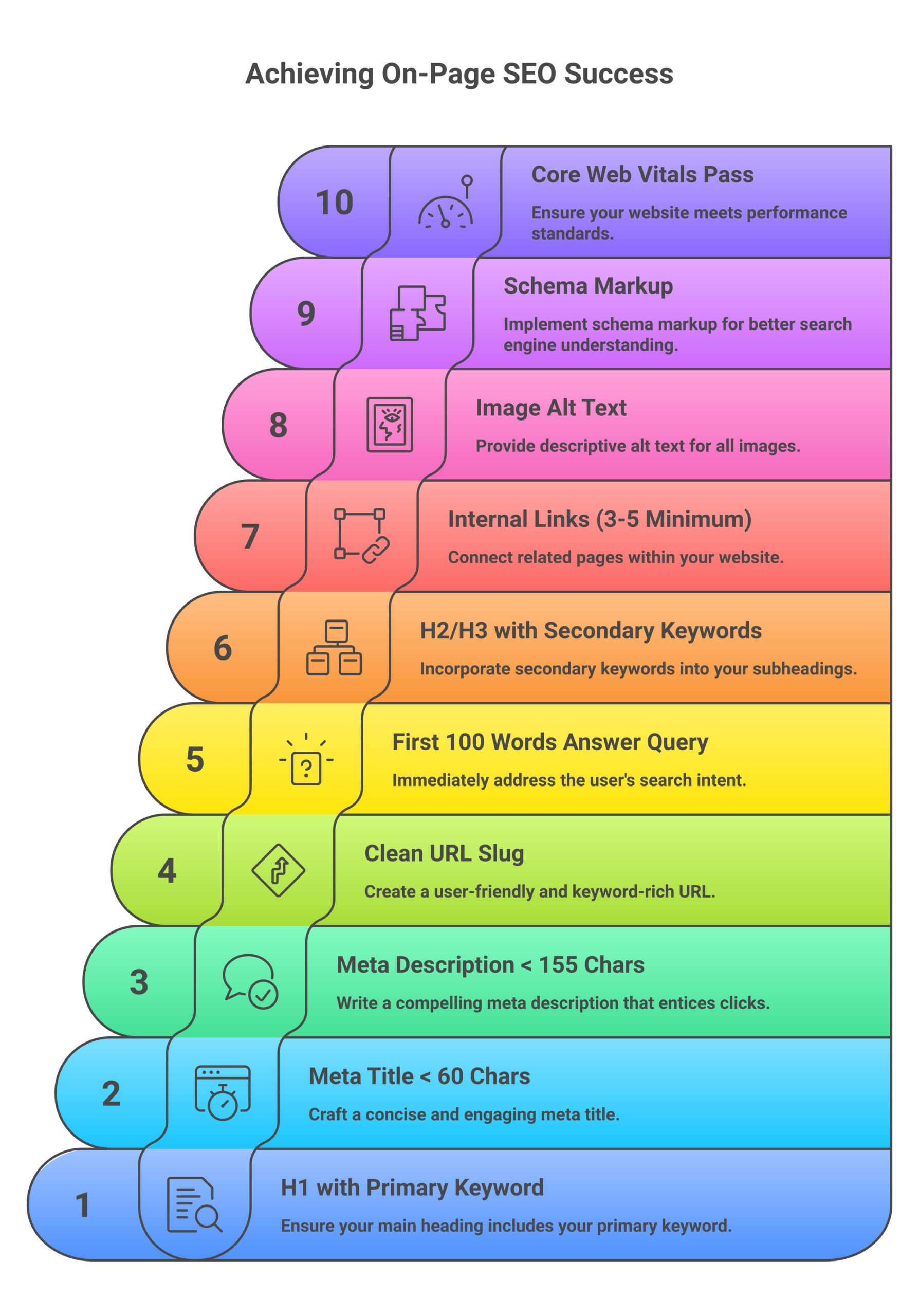
Why it matters: Your title tag is the first thing people see in search results. In 2026, it’s not just about keywords anymore—it’s about click appeal combined with relevance signals.
Quick tip: Use a format like “Primary Keyword – Secondary Benefit | Brand Name” to maximize both SEO value and click-through rate.
2. Write Compelling Meta Descriptions
What to do: Write unique meta descriptions of 150-160 characters that include your target keyword and a clear value proposition.
Why it matters: Meta descriptions don’t directly affect rankings, but they absolutely affect click-through rates, which can influence your SEO indirectly. Higher CTR signals to Google that your result is relevant.
Quick tip: Include a call-to-action and address user intent explicitly. Think of it as ad copy for organic search.
3. Craft Clean, Keyword-Rich URLs
What to do: Use short, descriptive URLs that include your primary keyword. Separate words with hyphens, avoid numbers and special characters.
Why it matters: Clean URLs are easier for users to read and share, and they provide search engines with clear topical signals.
Quick tip: Keep URLs under 75 characters when possible. Remove stop words like “and,” “the,” “of” unless needed for clarity.
4. Set Canonical Tags Correctly
What to do: Add a canonical tag to every page pointing to the preferred version of that content. For most pages, this will be self-referential.
Why it matters: Canonical tags prevent duplicate content issues and consolidate ranking signals to your preferred URL.
Quick tip: Always use absolute URLs (not relative) in canonical tags to avoid confusion.
Header Tag Hierarchy
5. Use One H1 Per Page
What to do: Include your primary keyword in a single, clear H1 tag at the top of your content. Never use multiple H1s on one page.
Why it matters: The H1 tells both users and search engines what your page is about. Multiple H1s dilute this signal and confuse page structure.
Quick tip: Your H1 should match or closely align with your title tag while sounding natural.
6. Structure Content With H2-H3 Subheadings
What to do: Break content into logical sections using H2 tags for main sections and H3 tags for subsections. Include related keywords naturally.
Why it matters: Header tags aren’t just for structure—they’re SEO gold when used right. This helps both readers and Google understand the hierarchy of your content, making it easier to skim, digest, and rank.
Quick tip: Never skip heading levels (don’t go from H2 to H4). Maintain proper hierarchy for accessibility and SEO.
7. Make Headings Scannable
What to do: Write headings that clearly describe the section content. Users should be able to understand your page structure by reading headings alone.
Why it matters: 80% of visitors scan rather than read. Clear headings improve user experience and dwell time—both ranking factors.
Quick tip: Use question-format headings to target featured snippets and PAA (People Also Ask) boxes.
Content Optimization
8. Target Search Intent Precisely
What to do: Analyze the top 10 results for your target keyword. Match the dominant content format (guide, listicle, comparison, etc.) and comprehensiveness level.
Why it matters: Google ranks pages that satisfy search intent. If users want a comparison and you write a tutorial, you won’t rank—regardless of quality.
Quick tip: Look at SERP features (featured snippets, PAA boxes, image packs) to understand what Google thinks users want. For more on this, see our keyword research guide.
9. Write Comprehensive, In-Depth Content
What to do: Cover your topic thoroughly. Target 1,500-3,000+ words for competitive keywords, but prioritize depth over arbitrary word counts.
Why it matters: Comprehensive content that fully answers user queries tends to rank higher and earn more link building. Thin content rarely survives in competitive niches.
Quick tip: Use the “inverted pyramid” structure—answer the main question in the first 100 words, then expand with details.
10. Include Primary and Related Keywords Naturally
What to do: Use your primary keyword 3-5 times per 1,000 words, with semantic variations and related terms throughout. Focus on natural language.
Why it matters: Keyword optimization helps search engines understand topical relevance, but in 2026, vector-based semantic search means Google understands meaning and context—not just exact matches.
Quick tip: Use tools to identify related terms that top-ranking pages include. Cover the topic comprehensively, not just the exact keyword.
11. Add Unique Data or Perspectives
What to do: Include original research, case studies, expert quotes, or unique analysis that competitors don’t have.
Why it matters: Google’s E-E-A-T framework (Experience, Expertise, Authoritativeness, Trustworthiness) rewards content that demonstrates firsthand experience and unique insights. This is especially critical for YMYL (Your Money, Your Life) topics. Learn more in our E-E-A-T SEO guide.
Quick tip: Even simple additions like “I tested this” or “In our analysis of 500 sites” dramatically improve perceived authority.
12. Update Publication Dates Regularly
What to do: When you update content, change the “modified” date to reflect freshness. For competitive topics, refresh content every 6-12 months.
Why it matters: AI platforms like ChatGPT cite content 25.7% fresher than traditional search. 76.4% of most-cited pages were updated within 30 days. Freshness is a ranking signal for time-sensitive queries.
Quick tip: Don’t just change the date—make meaningful updates to statistics, examples, and sections to justify the refresh.
Internal Linking Strategy
13. Link to Relevant Internal Pages
What to do: Include 3-5 internal links per 1,000 words to related content on your site. Link naturally within the body content, not just navigation.
Why it matters: internal linking distributes page authority, helps search engines discover and index pages, and keeps users on your site longer—all positive ranking signals.
Quick tip: Link to both high-authority pages (to share their ranking power) and orphan pages (to help them get crawled and ranked).
14. Use Descriptive Anchor Text
What to do: Use keyword-rich, descriptive anchor text that tells users and search engines what the linked page is about. Avoid generic “click here” or “read more.”
Why it matters: Anchor text provides context clues to search engines about the linked page’s topic and relevance.
Quick tip: Vary anchor text naturally. Don’t use the exact same anchor for every link to the same page.
15. Fix Broken Internal Links
What to do: Regularly audit your site for broken internal links (404 errors) and fix or redirect them.
Why it matters: Broken links waste crawl budget, hurt user experience, and leak page authority into dead ends.
Quick tip: Use tools like Screaming Frog or your CMS’s built-in link checker to identify broken links quarterly.
Image & Media Optimization
16. Compress Images for Fast Loading
What to do: Convert images to WebP or AVIF format. Compress to under 200KB per image without visible quality loss.
Why it matters: Images account for ~40% of average page weight. Image optimization is a technical SEO guide factor that directly impacts Core Web Vitals guide, particularly Largest Contentful Paint (LCP).
Quick tip: Use tools like ImageOptim, Squoosh, or CDN-based optimization (Cloudflare, ImageKit) for automated compression.
17. Write Descriptive Alt Text
What to do: Add alt text to every image describing what the image shows. Include keywords naturally when relevant, but prioritize accuracy.
Why it matters: Alt text improves accessibility for screen readers and provides context to search engines for image ranking in Google Images. However, alt text is only ~10% of image SEO—technical factors like file names, compression, and sitemaps drive the majority of Google Images traffic.
Quick tip: Format: “[What it is] [doing what] [in what context].” Example: “on-page SEO checklist spreadsheet template with checkboxes.”
18. Use Descriptive File Names
What to do: Rename image files with descriptive, keyword-rich names before uploading. Use hyphens between words, lowercase only.
Why it matters: Descriptive file names drive +127% more Google Images traffic than generic names like “IMG_1234.jpg.” This is one of the highest-impact image SEO factors.
Quick tip: Format: “primary-keyword-description.webp” (e.g., “on-page-seo-checklist-template.webp”).
19. Implement Lazy Loading (Correctly)
What to do: Enable lazy loading for below-the-fold images only. Never lazy load hero images, logos, or above-the-fold content.
Why it matters: Proper lazy loading reduces initial page weight and improves load time. Improper lazy loading (on hero images) can tank your LCP score from 1.2s to 3.8s.
Quick tip: Most modern CMSs handle this automatically. Verify by checking your largest contentful paint element in PageSpeed Insights.
20. Add Responsive Image Sizes
What to do: Use the srcset and sizes attributes to serve appropriately sized images based on device screen size.
Why it matters: Serving desktop-sized images to mobile users wastes bandwidth and slows load time. Responsive images improve mobile Core Web Vitals.
Quick tip: Your CMS likely generates srcset automatically. Verify by inspecting image elements in your browser.
Schema Markup & Structured Data
21. Implement Relevant Schema Types
What to do: Add JSON-LD structured data for your content type: Article/BlogPosting for blog posts, Product for e-commerce, HowTo for tutorials, FAQPage for FAQ sections.
Why it matters: schema markup guide acts as a bridge between your website content and search engine algorithms. When implemented correctly, it helps search engines deliver more informative results, which can significantly impact visibility and click-through rates. Properly implemented schema is associated with 2.5x AI visibility in 2026.
Quick tip: Use Google’s Rich Results Test to validate your schema before publishing. See our technical SEO guide for schema implementation details.
22. Include Author and Date Markup
What to do: Add author, datePublished, and dateModified properties to Article schema.
Why it matters: These signals support E-E-A-T evaluation and freshness ranking factors. They’re particularly important for YMYL content.
Quick tip: Always update dateModified when you refresh content—this signals freshness to search engines and AI crawlers.
23. Add FAQ Schema for Question Sections
What to do: If your page includes a FAQ section, wrap it in FAQPage schema with proper Question and Answer markup.
Why it matters: FAQ schema can trigger rich results in search, including expandable answer boxes that increase visibility and CTR.
Quick tip: Each question-answer pair should be wrapped in its own mainEntity object within the FAQPage schema.
Core Web Vitals & Performance
24. Optimize Core Web Vitals
What to do: Target these thresholds: Largest Contentful Paint (LCP) under 2.5 seconds, Interaction to Next Paint (INP) under 200ms, Cumulative Layout Shift (CLS) under 0.1.
Why it matters: Core Web Vitals remain crucial for SEO in 2026 as Google’s primary metrics for measuring real user experience. They function as a tiebreaker that becomes increasingly important as other ranking factors become equal. INP officially replaced FID in 2024 and has become stricter in 2026.
Quick tip: Test with PageSpeed Insights and focus on the field data (real user measurements) rather than just lab data.
25. Ensure Mobile Optimization
What to do: Test your page on multiple mobile devices. Ensure text is readable without zooming, tap targets are adequately sized (48x48px minimum), and content fits the screen.
Why it matters: Google officially uses mobile-first indexing. If your site isn’t mobile optimized, it’s not going to rank very well. The mobile version of your page is what Google indexes and ranks.
Quick tip: Use Google’s Mobile-Friendly Test tool and check Search Console’s “Mobile Usability” report for device-specific issues.
On-Page SEO Quick Reference Table
| Element | Target/Action | Priority |
|---|---|---|
| Title Tag | Primary keyword first, under 60 characters | Critical |
| Meta Description | 150-160 characters, include keyword + CTA | High |
| URL Structure | Short, keyword-rich, hyphens, no special chars | High |
| Canonical Tag | Self-referential on every page (absolute URLs) | Critical |
| H1 Tag | One per page, includes primary keyword | Critical |
| H2-H3 Tags | Logical hierarchy, no skipped levels, related keywords | High |
| Content Length | 1,500-3,000+ words for competitive topics | High |
| Search Intent | Match top 10 content format and depth | Critical |
| Keyword Density | 3-5 uses per 1,000 words (natural placement) | Medium |
| Content Freshness | Update every 6-12 months, change dateModified | High |
| Internal Links | 3-5 per 1,000 words, descriptive anchor text | High |
| Image Compression | WebP/AVIF format, under 200KB per image | High |
| Image File Names | Descriptive, keyword-rich, hyphens, lowercase | High |
| Alt Text | Descriptive, keyword when relevant, every image | Medium |
| Lazy Loading | Below-the-fold only, never hero images | Medium |
| Responsive Images | srcset + sizes attributes for device optimization | Medium |
| Schema Markup | JSON-LD for content type (Article, Product, HowTo, FAQ) | High |
| Author Schema | author, datePublished, dateModified in Article schema | Medium |
| LCP (Core Web Vitals) | Under 2.5 seconds | Critical |
| INP (Core Web Vitals) | Under 200 milliseconds | Critical |
| CLS (Core Web Vitals) | Under 0.1 | Critical |
| Mobile Optimization | Responsive design, 48x48px tap targets, readable text | Critical |
| Broken Links | Audit quarterly, fix all 404s | Medium |
| E-E-A-T Signals | Unique data, expert quotes, firsthand experience | High |
| Page Speed | Under 3 seconds total load time | High |
Frequently Asked Questions
What is on-page SEO?
On-page SEO refers to optimizations you make directly on your web pages to improve search rankings and user experience. This includes content quality, keyword usage, title tags, meta descriptions, header tags, internal links, image optimization, schema markup, and technical performance factors like Core Web Vitals.
How often should I update on-page SEO?
For competitive topics, refresh content every 6-12 months. Update statistics, examples, and add new sections to justify changing the “modified” date. For evergreen content with stable rankings, annual updates are sufficient. Monitor Search Console for declining traffic as a trigger for updates.
What’s the difference between on-page and off-page SEO?
On-page SEO is everything you control on your own website—content, HTML, structure, and performance. Off-page SEO involves external factors like backlinks, brand mentions, and social signals that happen on other sites. Both are essential for rankings.
Do meta descriptions affect rankings?
Meta descriptions don’t directly affect rankings as a ranking factor. However, they significantly impact click-through rates (CTR) from search results. Higher CTR can indirectly influence rankings by signaling to Google that your result is relevant and valuable to users.
How important are Core Web Vitals in 2026?
Core Web Vitals are crucial but not determinative. They function as one ranking factor among hundreds—think of them as a tiebreaker when other factors (content quality, relevance, authority) are equal. However, poor Core Web Vitals can significantly hurt user experience, leading to higher bounce rates and lower conversions.
Should I optimize for AI search in 2026?
Yes. AI platforms like ChatGPT cite content 25.7% fresher than traditional search engines. To optimize for AI visibility: answer queries directly in the first 100 words (67% more citations), include unique statistics (41% visibility boost), add expert quotes (28% visibility boost), and use clear H2/H3/bullet structure (40% more likely to be cited).
What’s the ideal keyword density?
There’s no magic number, but aim for 3-5 uses of your primary keyword per 1,000 words, used naturally. In 2026, focus on semantic relevance and topic coverage rather than exact keyword frequency. Google’s vector-based search understands meaning and context, not just keyword matching.
How many internal links should each page have?
Include 3-5 contextual internal links per 1,000 words of content. Link to both high-authority pages (to distribute ranking power) and orphan pages (to help them get indexed and ranked). Use descriptive anchor text and ensure links are genuinely helpful to users.
Implementation Order: Where to Start
If you’re looking at this 25-point checklist and feeling overwhelmed, start with the “Critical” priority items from the table above:
- Title tags and H1 optimization – Highest impact, easiest to fix
- Search intent alignment – Ensures you’re targeting the right content format
- Core Web Vitals – Technical foundation that affects all pages
- Mobile optimization – Required for mobile-first indexing
- Canonical tags – Prevents duplicate content issues
Once those are solid, move to “High” priority items like content depth, internal linking, image optimization, and schema markup. The “Medium” priority items are optimizations that add polish but won’t make or break your rankings.
Remember: on-page SEO is not a one-time task. It’s a continuous process of testing, measuring, and refining based on performance data. Use Google Search Console to identify pages with high impressions but low CTR (optimize titles and descriptions) or declining traffic (refresh and update content).
The pages that rank consistently in 2026 are those that combine technical excellence with genuine user value. Check off these 25 items, but never lose sight of the fundamental goal: SEO content writing guide that satisfies user intent better than any competing page.